

This post is the second in a series focused on the application of Ruby metaprogramming. If you're just starting to learn about metaprogramming, "Metaprogramming in Ruby: Beginner Level" is a great place to get started. In this article, we'll cover a practical application of Ruby metaprogramming. If you want to learn even more, stay tuned for the "advanced" post!
Since we already tackled a lot of metaprogramming fundamentals in our beginner level article, we'll be diving directly into code on this episode of Metaprogramming in Ruby. We'll start by laying out our specific problem then we'll go over the solution. But first, a disclaimer:
Ruby Metaprogramming is not the Only Solution#
It is very seldom the case that metaprogramming is the only answer to a given problem. The notable exception to this would be if you wanted to write a domain-specific language (DSL) or framework, such as Rails. In that case, yes, you'll probably be living and breathing metaprogramming.
For the rest of us mere mortals, our day-to-day programming problems could be solved in innumerable ways. That same logic applies here. We're presenting a scenario in which you might want to take a metaprogramming approach. You could, of course, opt for a different tactic if it is better aligned with your goals or constraints.
Problem Definition#
We have a subway station with inbound and outbound trains. The system could have over a hundred stations, each with their own inbound/outbound arrival times that vary based on the train line and station. For the sake of simplicity, we'll assume that each train arrives once per hour to its stations. Some stations will serve multiple train lines and each station will have service hours.
For a given station, how do we calculate the minutes until the next inbound or outbound train arrives?
Simplifying Parameters#
We'll apply a few parameters to simplify the problem and example code. Assume the following:
- There are two train lines: Red and Green
- There are three train stations: Porter, Union, and Park
- Porter station will serve only the Red line
- Union station will serve only the Green line
- Park station will serve both lines
- The Red line runs from 6:00 AM to 8:00 PM on weekdays
- The Green line runs from 12:00 PM to 8:00 PM every day
Here are the inbound arrival times
- Porter: Every hour at the 40 minute mark
- Union: Every hour at the 20 minute mark
- Park: Every hour at the 50 minute mark (Red line) and at the 10 minute mark (Green line)
And here are the outbound arrival times
- Porter: Every hour at the 45 minute mark
- Union: Every hour at the 25 minute mark
- Park: Every hour at the 55 minute mark (Red line) and at the 15 minute mark (Green line)
Practical Ruby Metaprogramming Example#
With that out of the way, let's examine our solution! We'll go through the most important aspects of the code here. Please note that this example uses Ruby 3.0.0 and Rails 7.0.4.
Creating a Builder with Ruby define_method#
At the core of our solution is a concern that we'll call MinutesTilBuilder. This will build our [station_name]_minutes_til_next methods, which will provide us with the minutes until the next inbound or outbound train arrives.
module MinutesTilBuilder
 extend ActiveSupport::Concern

 included do
   def self.build_minutes_til_methods(station_name:, train_lines:, arrival_times:)
     define_method("#{station_name}_minutes_til_next") do |direction, current_time|
       return nil if no_service(current_time)

       minutes = minutes_til(station_name, direction, train_lines, arrival_times, current_time)
       minutes&.ceil ||= nil
     end
   end
 end
 # ...calculations down here
end
So given our parameters, build_minutes_til_methods could generate the following methods:
porter_minutes_til_nextunion_minutes_til_nextpark_minutes_til_next
We won't drill down into the calculations associated with the minutes_til method, since those aren't crucial to understanding the metaprogramming concepts. In a nutshell, it determines the nearest train (either inbound or outbound, depending on the direction argument) for a given station, as defined by the station_name argument. Note that the method returns the minutes until that train's arrival regardless of the line that train is on.
Calling build_minutes_til_methods#
To build our methods, we include the MinutesTilBuilder concern in the HasMinutesTil module. In our example, our schedule is defined by the constant called ARRIVAL_TIMES.
module HasMinutesTil
 extend ActiveSupport::Concern
 include MinutesTilBuilder

 PORTER_ARRIVAL_TIMES = { red: { outbound: 45, inbound: 40 } }.freeze
 UNION_ARRIVAL_TIMES = { green: { outbound: 25, inbound: 20 } }.freeze
 PARK_ARRIVAL_TIMES = {
   red: { outbound: 55, inbound: 50 },
   green: { outbound: 15, inbound: 10 }
 }.freeze

 ARRIVAL_TIMES = {
   porter: PORTER_ARRIVAL_TIMES,
   union: UNION_ARRIVAL_TIMES,
   park: PARK_ARRIVAL_TIMES
 }.freeze

 included do
   build_minutes_til_methods(station_name: 'porter', train_lines: %w[red], arrival_times: ARRIVAL_TIMES)
   build_minutes_til_methods(station_name: 'union', train_lines: %w[green], arrival_times: ARRIVAL_TIMES)
   build_minutes_til_methods(station_name: 'park', train_lines: %w[red green], arrival_times: ARRIVAL_TIMES)
 end
end
Calling Methods for User-specific Stations#
Any given user will have a set of stations they want to track. So we'll create a User class that includes HasMinutesTil and calls the builder methods created by MinutesTilBuilder for the stations they want to track. The user-specified stations are defined by the USER_TRAIN_STATIONS constant in this example; in practice, you would need to fetch this data wherever it's persisted.
class User
 include HasMinutesTil

 USER_TRAIN_STATIONS = %i[porter, union, park].freeze

 def incoming_trains(stations:, direction:, current_time:)
   stations.each_with_object({}) do |station_name, hash|
     hash[station_name] = send("#{station_name}_minutes_til_next", direction, current_time) || "No service"
   end
 end
end
Loading Data into Our Controller#
From our controller, we can call user.incoming_trains to get the nearest incoming trains for the user-specified stations.
class OutboundController < ApplicationController
 def index
   user = User.new

   # This is here purely so we can we can easily
   # specify different times for this example.
   @current_time = Time.current

   @minutes_til_next = user.incoming_trains(
     stations: User::USER_TRAIN_STATIONS,
     direction: "outbound",
     current_time: @current_time
   )
 end
end
Displaying the Data in Our View#
We can then add the data into our view using a partial that I'll call _stations.html.erb. I'm using tailwindcss here, but the styling is immaterial for this example.
<div class="grid grid-flow-col grid-cols-3 gap-6 mb-6">
   <div class="bg-gray-200 py-8 px-4">
       <h2 class="text-xl pb-3">Porter</h2>
       <div class="grid grid-rows-2">
           <div><span class="text-4xl"><%= @minutes_til_next[:porter] %><span></div>
       </div>
   </div>
   <div class="bg-gray-200 py-6 px-3">
       <h2 class="text-xl pb-3">Union</h2>
       <div class="grid grid-rows-2">
           <div><span class="text-4xl"><%= @minutes_til_next[:union] %><span></div>
       </div>
   </div>
   <div class="bg-gray-200 py-6 px-3">
       <h2 class="text-xl pb-3">Park</h2>
       <div class="grid grid-rows-2">
           <div><span class="text-4xl"><%= @minutes_til_next[:park] %><span></div>
       </div>
   </div>
</div>
Checking Out the Results#
By modifying the @current_time in our OutboundController, we can see how our station methods are calculating the minutes until train arrival. For example, if we specify the time as 3/10/23 10:00 AM with Time.new(2023, 3, 10, 10), we get this result on the /outbound route:
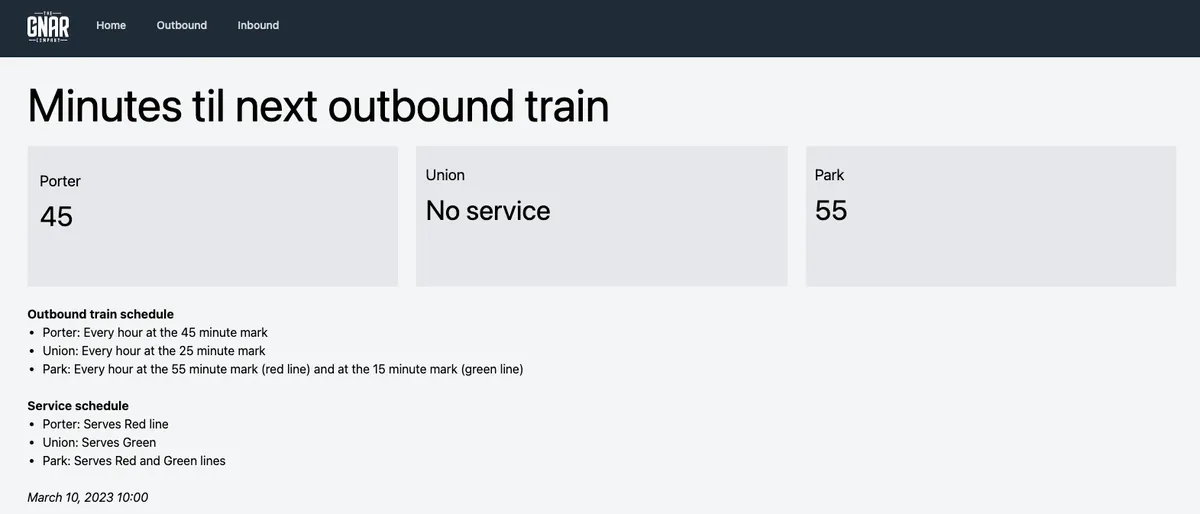
Porter and Park stations both serve the Red line, so their arrival times make perfect sense. Service isn't available at Union station since it doesn't open until noon. What happens if we set the time to 3/10/23 1:05 PM with Time.new(2023, 3, 10, 13, 5)?
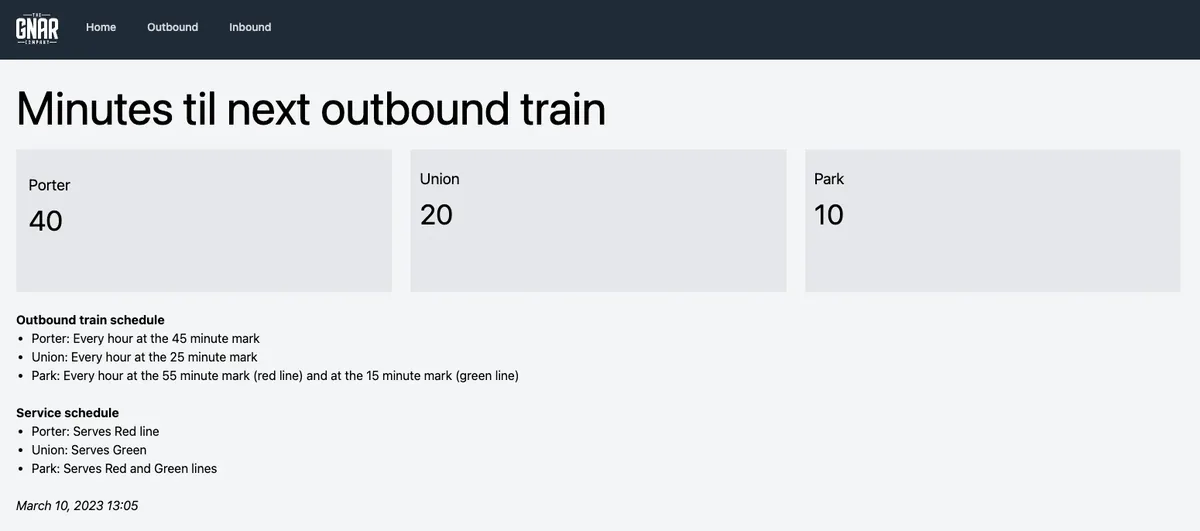
Union station is now open! We can also see that the Park street station displays 10 minutes, since it serves both the Red and Green lines, and the next Green line train will arrive at 1:15 PM.
Wrapping Up Our Intermediate Ruby Metaprogramming Example#
That's it! There's obviously things that could be improved here (e.g., create a parent controller for inbound/outbound controllers to inherit from, DRY up the _stations.html.erb partial, etc.), but I never claimed this was a perfect example. And if you want to go even further beyond, stay tuned for the next installment of our Metaprogramming in Ruby series!
Learn more about how The Gnar builds Ruby on Rails applications.